Capabilities
Ready-made endpoints for text, image, speech and video tasks — translation, OCR, receipts, transcription, background removal, virtual try-on and more — on the same key.
Set TOKENHUB_API_KEY to your key. JavaScript examples use Node.js 22 or later, Python examples use the standard library, and curl examples use jq.
const body = {
  "text": "Good morning, how are you?",
  "target_language": "ms"
};
const response = await fetch("https://tokenhub-api.belive.sg/api/v1/translate", {
  method: "POST",
  headers: {
    Authorization: "Bearer " + process.env.TOKENHUB_API_KEY,
    "Content-Type": "application/json",
  },
  body: JSON.stringify(body),
});
if (!response.ok) throw new Error("Request failed: " + response.status);
const result = await response.json();
console.log(result);
import json
import os
import urllib.request

body = json.loads(r'''{
  "text": "Good morning, how are you?",
  "target_language": "ms"
}''')
request = urllib.request.Request(
    "https://tokenhub-api.belive.sg/api/v1/translate",
    data=json.dumps(body).encode("utf-8"),
    headers={
        "Authorization": f"Bearer {os.environ['TOKENHUB_API_KEY']}",
        "Content-Type": "application/json",
    },
)
with urllib.request.urlopen(request, timeout=180) as response:
    print(json.dumps(json.load(response), indent=2))
curl --fail-with-body -sS 'https://tokenhub-api.belive.sg/api/v1/translate' \
  -H "Authorization: Bearer $TOKENHUB_API_KEY" \
  -H "Content-Type: application/json" \
  -d '{
  "text": "Good morning, how are you?",
  "target_language": "ms"
}'
{
  "capability": "lang/translate",
  "created": 1788393600,
  "translated_text": "Selamat pagi, bagaimana khabar anda?",
  "source_language": "en",
  "target_language": "ms"
}
Synchronous answers name their capability and created time, followed by the task's fields. Job submissions return a job id and polling URL. There is no model to choose: AI Hub picks what serves each capability, and the response does not name it. Text and image analysis answer at once; speech, image editing and video processing run as jobs. The full list, with prices, is on the APIs page of the console. Availability is evaluated for your workspace; check the API's current status before calling it. A reference describes the contract and does not enable an API.
Text
language, source_language and target_language take en, ms, id, th, vi, fil, zh, km, lo or my.
| POST /api/v1… | Send | Get back |
|---|---|---|
/translate | text, target_language, source_language? | translated_text, source_language |
/text/sentiment | text, language? | sentiment, score, confidence, aspects |
/text/keywords | text, max_keywords?, language? | keywords |
/text/entities | text, types? | entities (with character offsets) |
/text/moderate | text, categories? | verdict, categories |
/text/intent | text, intents?, language? | intent, confidence, runners_up |
/text/summarise | text, style?, max_words?, language? | summary, bullets |
/commerce/reviews | reviews: [{text}], max_themes?, language? | overall_sentiment, themes, praise, complaints |
/commerce/listing | product: {name, detail?, attributes?: [{name, value}]}, marketplaces (1–5), language?, tone? | listings: [{marketplace, title, bullets, description}] |
/commerce/listing takes the marketplaces shopee, lazada, tiktok_shop, amazon and shopify, and writes each listing inside that marketplace's title, bullet and description limits. tone is plain (the default), warm or premium. It takes longer than the other text endpoints: up to about 12 seconds.
Images
Image endpoints take a file_id: upload the image first (below), then send its id. Images must be PNG or JPEG, at most 10 MiB.
| POST /api/v1… | Send | Get back |
|---|---|---|
/vision/ocr | file_id | lines, each with text and box |
/vision/ocr/receipt | file_id | merchant, date, currency, total, tax, items |
/vision/tables | file_id | tables, form_fields |
/vision/barcode | file_id | codes |
/vision/moderate | file_id | verdict, categories |
/vision/logos | file_id | logos |
/vision/tags | file_id, max_tags? (1–50, default 10) | tags, each with label and category |
/vision/quality | file_id | overall_quality_score |
/vision/crop | file_id, aspect_ratios | crops, each with a rectangle |
/commerce/pricetag | file_id | price, currency, original_price, unit |
/commerce/attributes | file_id | category, attributes: [{name, value}] |
/commerce/pricetag answers 422 with error type no_price_found when the image holds no readable price, such as a photo with no price tag in it. That answer is not charged.
/vision/crop takes one to five distinct aspect_ratios such as "1:1" or "16:9", and returns each crop as a rectangle in fractions of the image's width and height.
Documents
Upload a PDF for layout extraction or a DOCX for conversion to PDF. Both operations run as jobs. Their full references list accepted file types, bounds and output fields.
| POST /api/v1… | Send | Get back |
|---|---|---|
/documents/extract | file_id | Structured layout JSON: each page's text blocks and tables in reading order. |
/documents/convert | file_id | One PDF of the document. |
Virtual try-on
POST /api/v1/commerce/tryon puts a garment on a person and answers at once with one image (data[0].b64_json, PNG). Send two uploaded images and confirm you have the right to use them:
{
  "person_image_file_id": "file_…",
  "product_image_file_id": "file_…",
  "person_image_consent": true,
  "product_image_rights": true
}
Both flags must be true, or the request is 400. Each image must be 7 MB or smaller. See the full try-on reference.
Speech
POST /api/v1/audio/speech reads up to 600 characters aloud and answers at once with one WAV (24 kHz, mono). Send input, a voice and optionally a language, which is detected when omitted. The voices are female_bright, female_calm, female_us, male_warm, male_us and male_news. See the full speech reference.
The following analysis and denoising operations take an uploaded mono MP3 or WAV recording (file_id, up to 60 minutes) and run as jobs:
| POST /api/v1… | Send | Get back |
|---|---|---|
/audio/transcriptions | file_id | transcript: text and timed segments |
/audio/language | file_id | result: language, and the language of each span |
/audio/speakers | file_id, language? (en) | result: timed turns labelled speaker_1 / speaker_2 |
/audio/moderate | file_id | result: verdict and categories with spans |
/audio/denoise | file_id | a cleaned MP3 (44.1 kHz mono) under unsigned_urls |
/audio/speakers needs a recording of 30 seconds to 60 minutes. A shorter recording is refused before it runs with 400 invalid_request, metadata.reason input_too_short and the message “speaker diarisation needs a recording of at least 30 seconds”, and is not charged.
Long scripts and voice separation
| POST /api/v1… | Send | Get back |
|---|---|---|
/audio/speech/jobs | input, voice, language? | One WAV (24 kHz mono) and an MP3 of the same recording, kept for seven days. Priced once per started 300 counted characters; a job that fails has no cost. |
/audio/separate | file_id | Two MP3 files as long as the input: the voice, and the background (music and sound). Two stems only. |
Long-form speech accepts up to 5,000 counted characters, with each Chinese character counting as two. It joins the parts into one WAV and one MP3. Voice separation accepts a recording or a video of up to 30 minutes and returns separate voice and background MP3s.
const body = {
  "input": "Welcome to our weekly product update. Here are the details for this week.",
  "voice": "female_bright",
  "language": "en"
};
const response = await fetch("https://tokenhub-api.belive.sg/api/v1/audio/speech/jobs", {
  method: "POST",
  headers: {
    Authorization: "Bearer " + process.env.TOKENHUB_API_KEY,
    "Content-Type": "application/json",
    "Idempotency-Key": process.env.TOKENHUB_IDEMPOTENCY_KEY,
  },
  body: JSON.stringify(body),
});
if (!response.ok) throw new Error("Request failed: " + response.status);
const result = await response.json();
console.log(result);
import json
import os
import urllib.request

body = json.loads(r'''{
  "input": "Welcome to our weekly product update. Here are the details for this week.",
  "voice": "female_bright",
  "language": "en"
}''')
request = urllib.request.Request(
    "https://tokenhub-api.belive.sg/api/v1/audio/speech/jobs",
    data=json.dumps(body).encode("utf-8"),
    headers={
        "Authorization": f"Bearer {os.environ['TOKENHUB_API_KEY']}",
        "Content-Type": "application/json",
        "Idempotency-Key": os.environ["TOKENHUB_IDEMPOTENCY_KEY"],
    },
)
with urllib.request.urlopen(request, timeout=180) as response:
    print(json.dumps(json.load(response), indent=2))
curl --fail-with-body -sS 'https://tokenhub-api.belive.sg/api/v1/audio/speech/jobs' \
  -H "Authorization: Bearer $TOKENHUB_API_KEY" \
  -H "Content-Type: application/json" \
  -H "Idempotency-Key: $TOKENHUB_IDEMPOTENCY_KEY" \
  -d '{
  "input": "Welcome to our weekly product update. Here are the details for this week.",
  "voice": "female_bright",
  "language": "en"
}'
Set a new TOKENHUB_IDEMPOTENCY_KEY for each new job. Reuse that same value if the submission outcome is uncertain, and follow the polling steps below.
Speech sample
This retained output is the console's real voice-over example from 2026-09-27, using female_bright in English.
Script: Meet Solyne Air wireless earbuds! Crystal-clear sound, thirty-hour battery, and a comfy fit. Grab yours today!
Request
import { writeFile } from "node:fs/promises";

const body = {
  "input": "Meet Solyne Air wireless earbuds! Crystal-clear sound, thirty-hour battery, and a comfy fit. Grab yours today!",
  "voice": "female_bright",
  "language": "en"
};
const response = await fetch("https://tokenhub-api.belive.sg/api/v1/audio/speech", {
  method: "POST",
  headers: {
    Authorization: "Bearer " + process.env.TOKENHUB_API_KEY,
    "Content-Type": "application/json",
  },
  body: JSON.stringify(body),
});
if (!response.ok) throw new Error("Speech request failed: " + response.status);
await writeFile("speech.wav", Buffer.from(await response.arrayBuffer()));
import json
import os
import urllib.request

body = json.loads(r'''{
  "input": "Meet Solyne Air wireless earbuds! Crystal-clear sound, thirty-hour battery, and a comfy fit. Grab yours today!",
  "voice": "female_bright",
  "language": "en"
}''')
request = urllib.request.Request(
    "https://tokenhub-api.belive.sg/api/v1/audio/speech",
    data=json.dumps(body).encode("utf-8"),
    headers={
        "Authorization": f"Bearer {os.environ['TOKENHUB_API_KEY']}",
        "Content-Type": "application/json",
    },
)
with urllib.request.urlopen(request, timeout=180) as response:
    with open("speech.wav", "wb") as output:
        output.write(response.read())
curl --fail-with-body -sS 'https://tokenhub-api.belive.sg/api/v1/audio/speech' \
  -H "Authorization: Bearer $TOKENHUB_API_KEY" \
  -H "Content-Type: application/json" \
  -d '{
  "input": "Meet Solyne Air wireless earbuds! Crystal-clear sound, thirty-hour battery, and a comfy fit. Grab yours today!",
  "voice": "female_bright",
  "language": "en"
}' \
  -o speech.wav
Voice separation illustration
These retained console samples illustrate the input and output tracks. The mix was made from the two source tracks shown here; these are illustrative stems, not a new API result.
Image editing
/vision/background returns the subject on a transparent PNG; /vision/upscale returns an image four times as wide and tall. Both take a file_id and run as jobs; the result is a file under unsigned_urls. See the full references for background removal and upscaling.
| POST /api/v1… | Send | Get back |
|---|---|---|
/vision/erase | file_id, target?, boxes | The same photo as a PNG, the text in each box filled in and everything outside the boxes kept. |
/vision/outpaint | file_id, aspect_ratio | One PNG at the ratio, at most 2048 px on its longer side, with the original centred and its position reported. |
/vision/background-replace | file_id, background | The same photo as a PNG, with the product unchanged on the new background. |
Text erasure takes explicit boxes and removes overlaid text; it does not remove logos. Background replacement takes a product image and a listed background preset, and refuses images containing people. Outpainting extends the image to a supported aspect ratio.
Video processing
Upload the source before starting a job. Accepted containers, duration, size and frame-rate limits differ by operation; consult its full reference. File-producing routes expose output links in unsigned_urls or result. Analysis jobs return structured results. The console shows each API's unit and any price tiers.
| POST /api/v1… | Send | Get back |
|---|---|---|
/video/transcode | file_id, resolution? (480p | 720p | 1080p) | an MP4 at that resolution |
/video/subtitles | file_id, subtitle_file_id | an MP4 with the subtitles burned in |
/video/watermark | file_id, text or image_file_id | an MP4 with a visible watermark |
/video/moderate | file_id | moderation: suggestion and categories |
/video/highlights | file_id, max_highlights? (1–10, default 3), prompt? | ranked source ranges, JPEG covers and optional MP4 clips |
/video/avatar | image_file_id, audio_file_id (MP3 or WAV, 2–15 s), resolution? (720p | 1080p) | an MP4 of the portrait speaking the audio |
More video operations
| POST /api/v1… | Send | Get back |
|---|---|---|
/video/translate | file_id, source_language, target_language, format? | A timed subtitle file (SRT or WebVTT) in the target language. |
/video/captions | file_id, language, format? | A timed subtitle file (SRT or WebVTT) and each line with its times and the recogniser's confidence from 0 to 100. |
/video/quality | file_id | A quality score out of 100, timed defects and stream issues. |
/media/enhance | file_id, treatment?, output_size? | One 720p H.264 MP4 of the same length with the picture enhanced. |
/video/clips | file_id, focus?, max_clip_seconds?, max_clips?, aspect_ratio? | Up to 20 clips, each an MP4 with a cover image, a title, a short summary and keywords, plus a summary of the whole video. |
/video/scenes | file_id | The scenes in order, each with its start and end time in milliseconds. |
/video/erase | file_id, target? | One MP4 at the source's length, size and frame rate, with its audio. Subtitles only; logos and watermarks are never removed. |
/video/interpolate | file_id, fps? | One 60 fps MP4 with new in-between frames, at the source's length and size, with its audio. |
/video/face-blur | file_id, style? | One MP4 at the source's length, size and frame rate, with its audio. No face positions, counts or identity data are returned. |
/video/summarise | file_id | A short summary, up to 20 chapters with approximate start and end times, and tags. |
/video/assemble | audio_file_id?, clips, resolution | One MP4 of the clips in the order given, each cut to its range, with their audio or the MP3 in its place. |
/video/reframe | aspect_ratio?, file_id, keep?, crop_x? | One 9:16 MP4 that follows the main subject, with the original audio. |
Captioning and translated captions produce timed subtitle files. Scene detection returns scene boundaries; it does not generate a new video. Subtitle erasure removes burned-in subtitles only. Interpolation, enhancement and reframing have their own output options.
/video/highlights takes a video of at most 3,600 seconds and 2 GiB.max_highlights caps the count, from 1 to 10 (default 3): a job returns the distinct moments it finds, up to the cap. An optional prompt steers which moments it selects. Each completed highlight names source time ranges in milliseconds, a JPEG cover and, when rendered, an MP4 clip; their links appear in the job's unsigned_urls.
A text watermark is placed at top_left; another position is 400 unsupported_parameter for text. A subtitle file is an SRT uploaded with content_type application/x-subrip. Watermark and subtitle burn-in keep the input's size, so they refuse an input larger than 1080p.
The avatar's 720p option returns a 720p-class video that keeps the portrait's aspect ratio, not exactly 1280×720: a portrait input returned 816×1104. The video can run slightly longer than the audio: 6.0 seconds of audio returned 6.133 seconds of video.
Asynchronous jobs
A job answers 202 with its id and a polling_url. Poll it until status is completed, failed or expired. A completed job carries its answer (transcript or result), or its output files under unsigned_urls, and its usage in USD.
{
  "id": "job_…",
  "capability": "speech/moderate",
  "polling_url": "/api/v1/audio/moderate/job_…",
  "status": "completed",
  "result": {
    "outcome": "moderated",
    "verdict": "block",
    "categories": [{
      "category": "contact_sharing",
      "severity": "high",
      "spans": [{ "text": "912-34567", "start_ms": 0, "end_ms": 14480 }]
    }]
  },
  "usage": { "cost": 0.00075, "tokenhub_cost": "0.00075000", "is_byok": false }
}
polling_urlis either a full URL or a path such as/api/v1/audio/moderate/job_…; resolve a path against the API host. Every job can also be read atGET /api/v1/jobs/{id}.- Output files need your API key to download, and are kept until
content_expires_at. - Send an
Idempotency-Keyheader on the submit. A repeat with the same key returns the same job and never starts a second one.
Poll the same job
Set TOKENHUB_JOB_ID to the id returned by the submission. A polling timeout does not cancel the job; continue reading that id instead of submitting another job.
const jobId = process.env.TOKENHUB_JOB_ID;
let job;
for (let attempt = 0; attempt < 120; attempt++) {
  const response = await fetch("https://tokenhub-api.belive.sg/api/v1/jobs/" + encodeURIComponent(jobId), {
    headers: { Authorization: "Bearer " + process.env.TOKENHUB_API_KEY },
  });
  if (!response.ok) throw new Error("Poll failed: " + response.status);
  job = await response.json();
  if (job.status === "completed") break;
  if (job.status === "failed" || job.status === "expired") {
    throw new Error("Job ended: " + job.status);
  }
  if (attempt === 119) throw new Error("Still running; poll the same job later");
  await new Promise((resolve) => setTimeout(resolve, 3000));
}
console.log(job);
import json
import os
import time
import urllib.parse
import urllib.request

job_id = urllib.parse.quote(os.environ["TOKENHUB_JOB_ID"], safe="")
for attempt in range(120):
    request = urllib.request.Request(
        "https://tokenhub-api.belive.sg/api/v1/jobs/" + job_id,
        headers={"Authorization": f"Bearer {os.environ['TOKENHUB_API_KEY']}"},
    )
    with urllib.request.urlopen(request, timeout=30) as response:
        job = json.load(response)
    if job["status"] == "completed":
        break
    if job["status"] in ("failed", "expired"):
        raise RuntimeError("Job ended: " + job["status"])
    time.sleep(3)
else:
    raise TimeoutError("Still running; poll the same job later")
print(json.dumps(job, indent=2))
# Repeat this read until status is completed, failed or expired.
curl --fail-with-body -sS "https://tokenhub-api.belive.sg/api/v1/jobs/$TOKENHUB_JOB_ID" \
  -H "Authorization: Bearer $TOKENHUB_API_KEY"
Download an output
For a completed job that produces files, select an AI Hub content URL from its unsigned_urls or result and set TOKENHUB_OUTPUT_URL. Resolve a relative URL against the API host before using curl. Keep your API key on the AI Hub host; download before content_expires_at.
import { writeFile } from "node:fs/promises";

const apiHost = new URL("https://tokenhub-api.belive.sg/api/v1").origin;
const url = new URL(process.env.TOKENHUB_OUTPUT_URL, apiHost);
if (url.origin !== apiHost) throw new Error("Expected an AI Hub content URL");
const response = await fetch(url, {
  headers: { Authorization: "Bearer " + process.env.TOKENHUB_API_KEY },
  redirect: "error",
});
if (!response.ok) throw new Error("Download failed: " + response.status);
await writeFile("output.bin", Buffer.from(await response.arrayBuffer()));
import os
import shutil
import urllib.parse
import urllib.request

api = urllib.parse.urlsplit("https://tokenhub-api.belive.sg/api/v1")
api_host = api.scheme + "://" + api.netloc + "/"
url = urllib.parse.urljoin(api_host, os.environ["TOKENHUB_OUTPUT_URL"])
output = urllib.parse.urlsplit(url)
if (output.scheme, output.netloc) != (api.scheme, api.netloc):
    raise ValueError("Expected an AI Hub content URL")

class NoRedirect(urllib.request.HTTPRedirectHandler):
    def redirect_request(self, req, fp, code, msg, headers, newurl):
        return None

request = urllib.request.Request(
    url,
    headers={"Authorization": f"Bearer {os.environ['TOKENHUB_API_KEY']}"},
)
opener = urllib.request.build_opener(NoRedirect())
with opener.open(request, timeout=180) as response:
    with open("output.bin", "wb") as destination:
        shutil.copyfileobj(response, destination)
# Use the full AI Hub content URL from the completed job.
case "$TOKENHUB_OUTPUT_URL" in
  "https://tokenhub-api.belive.sg/api/v1/"*) ;;
  *) echo "Expected an AI Hub content URL" >&2; exit 1 ;;
esac
curl --fail-with-body -sS "$TOKENHUB_OUTPUT_URL" \
  -H "Authorization: Bearer $TOKENHUB_API_KEY" \
  -o output.bin
Uploading a file
Reserve an upload slot, then send the bytes to the URL you get back with one PUT. Reserving a slot costs nothing.
import { readFile } from "node:fs/promises";

const bytes = await readFile("photo.jpg");
const reservation = await fetch("https://tokenhub-api.belive.sg/api/v1/files", {
  method: "POST",
  headers: {
    Authorization: "Bearer " + process.env.TOKENHUB_API_KEY,
    "Content-Type": "application/json",
  },
  body: JSON.stringify({
    content_type: "image/jpeg",
    bytes: bytes.length,
  }),
});
if (!reservation.ok) throw new Error("Upload reservation failed: " + reservation.status);
const slot = await reservation.json();
// The signed upload URL needs its upload headers, without the API key.
const upload = await fetch(slot.upload_url, {
  method: slot.upload_method,
  headers: slot.upload_headers,
  body: bytes,
  redirect: "error",
});
if (!upload.ok) throw new Error("Upload failed: " + upload.status);
console.log(slot.id); // Use this value as file_id in the API request.
import json
import os
import urllib.request
from pathlib import Path

contents = Path("photo.jpg").read_bytes()
request = urllib.request.Request(
    "https://tokenhub-api.belive.sg/api/v1/files",
    data=json.dumps({
        "content_type": "image/jpeg",
        "bytes": len(contents),
    }).encode("utf-8"),
    headers={
        "Authorization": f"Bearer {os.environ['TOKENHUB_API_KEY']}",
        "Content-Type": "application/json",
    },
)
with urllib.request.urlopen(request, timeout=30) as response:
    slot = json.load(response)
# The signed upload URL needs its upload headers, without the API key.
upload = urllib.request.Request(
    slot["upload_url"],
    data=contents,
    method=slot["upload_method"],
    headers=slot["upload_headers"],
)
with urllib.request.urlopen(upload, timeout=180) as response:
    response.read()
print(slot["id"])  # Use this value as file_id in the API request.
FILE=photo.jpg
BYTES=$(wc -c < "$FILE" | tr -d ' ')
curl --fail-with-body -sS 'https://tokenhub-api.belive.sg/api/v1/files' \
  -H "Authorization: Bearer $TOKENHUB_API_KEY" \
  -H "Content-Type: application/json" \
  -d "$(jq -n --argjson bytes "$BYTES" \
    '{content_type: "image/jpeg", bytes: $bytes}')" \
  -o upload-slot.json

jq -r '.upload_headers | to_entries[] | "\(.key): \(.value)"' \
  upload-slot.json > upload-headers.txt
curl --fail-with-body -sS -X PUT \
  "$(jq -r '.upload_url' upload-slot.json)" \
  -H @upload-headers.txt \
  --data-binary "@$FILE"
jq -r '.id' upload-slot.json
bytes must be the exact file size, and the PUT must carry the upload_headers. The upload URL is signed and needs no API key; it stops working at expires_at. The file is deleted at delete_after. A workspace can reserve 20 files an hour by default; an operator can change the limit for an individual workspace. Past the configured limit, POST /files answers 429 rate_limit_exceeded with metadata.retry_after_s.
Worked examples
Retained AI Hub examples from 2026-09-23 to 2026-09-25, with the outputs they returned. Each image was uploaded first, as above, and its file_id sent. Replace the example file ids with your own. Response excerpts retain their historical usage figures; check the current API detail for pricing.
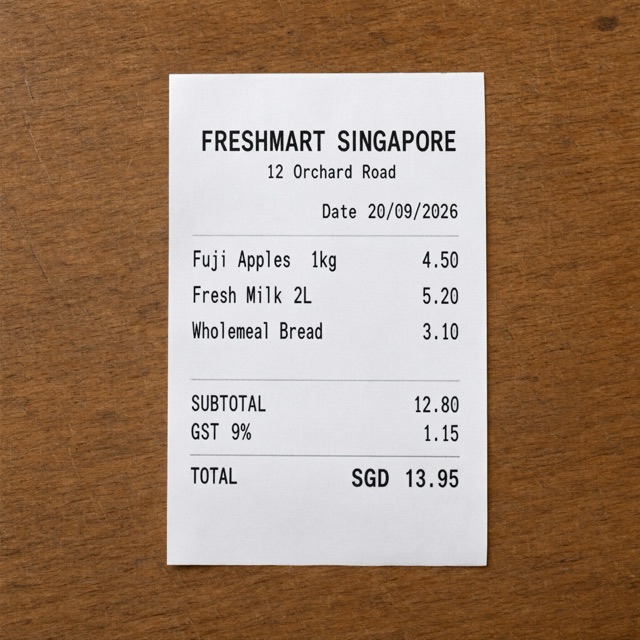
Read the text on a receipt
const body = {
  "file_id": "file_…"
};
const response = await fetch("https://tokenhub-api.belive.sg/api/v1/vision/ocr", {
  method: "POST",
  headers: {
    Authorization: "Bearer " + process.env.TOKENHUB_API_KEY,
    "Content-Type": "application/json",
  },
  body: JSON.stringify(body),
});
if (!response.ok) throw new Error("Request failed: " + response.status);
const result = await response.json();
console.log(result);
import json
import os
import urllib.request

body = json.loads(r'''{
  "file_id": "file_…"
}''')
request = urllib.request.Request(
    "https://tokenhub-api.belive.sg/api/v1/vision/ocr",
    data=json.dumps(body).encode("utf-8"),
    headers={
        "Authorization": f"Bearer {os.environ['TOKENHUB_API_KEY']}",
        "Content-Type": "application/json",
    },
)
with urllib.request.urlopen(request, timeout=180) as response:
    print(json.dumps(json.load(response), indent=2))
curl --fail-with-body -sS 'https://tokenhub-api.belive.sg/api/v1/vision/ocr' \
  -H "Authorization: Bearer $TOKENHUB_API_KEY" \
  -H "Content-Type: application/json" \
  -d '{
  "file_id": "file_…"
}'
{
  "capability": "vision/ocr-general",
  "created": 1790175454,
  "lines": [
    { "text": "FRESHMART SINGAPORE", "box": [0.1985, 0.3145, 0.2415, 0.7175] },
    { "text": "12 Orchard Road", "box": [0.2535, 0.4175, 0.2825, 0.6185] },
    { "text": "Date 20/09/2026", "box": [0.3115, 0.5035, 0.3445, 0.7165] },
    { "text": "Fuji Apples 1kg 4.50", "box": [0.3825, 0.2955, 0.4295, 0.5325] },
    { "text": "Fresh Milk 2L 5.20", "box": [0.4405, 0.3025, 0.4795, 0.4975] },
    { "text": "Wholemeal Bread 3.10", "box": [0.4965, 0.2965, 0.5355, 0.5075] },
    { "text": "SUBTOTAL 12.80", "box": [0.6135, 0.2965, 0.6465, 0.4195] },
    { "text": "GST 9% 1.15", "box": [0.6565, 0.2965, 0.6915, 0.3955] },
    { "text": "TOTAL SGD 13.95", "box": [0.7245, 0.2055, 0.7635, 0.6145] }
  ]
}
box is [ymin, xmin, ymax, xmax], each a fraction of the image's height or width.
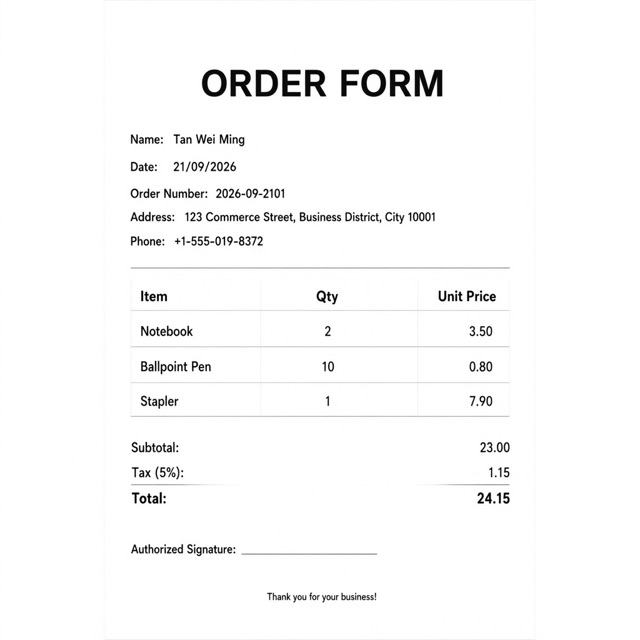
Pull a table and form fields out of a scanned form
const body = {
  "file_id": "file_…"
};
const response = await fetch("https://tokenhub-api.belive.sg/api/v1/vision/tables", {
  method: "POST",
  headers: {
    Authorization: "Bearer " + process.env.TOKENHUB_API_KEY,
    "Content-Type": "application/json",
  },
  body: JSON.stringify(body),
});
if (!response.ok) throw new Error("Request failed: " + response.status);
const result = await response.json();
console.log(result);
import json
import os
import urllib.request

body = json.loads(r'''{
  "file_id": "file_…"
}''')
request = urllib.request.Request(
    "https://tokenhub-api.belive.sg/api/v1/vision/tables",
    data=json.dumps(body).encode("utf-8"),
    headers={
        "Authorization": f"Bearer {os.environ['TOKENHUB_API_KEY']}",
        "Content-Type": "application/json",
    },
)
with urllib.request.urlopen(request, timeout=180) as response:
    print(json.dumps(json.load(response), indent=2))
curl --fail-with-body -sS 'https://tokenhub-api.belive.sg/api/v1/vision/tables' \
  -H "Authorization: Bearer $TOKENHUB_API_KEY" \
  -H "Content-Type: application/json" \
  -d '{
  "file_id": "file_…"
}'
{
  "capability": "vision/table-extract",
  "created": 1790175100,
  "tables": [{
    "headers": ["Item", "Qty", "Unit Price"],
    "rows": [
      ["Notebook", "2", "3.50"],
      ["Ballpoint Pen", "10", "0.80"],
      ["Stapler", "1", "7.90"]
    ]
  }],
  "form_fields": [
    { "key": "Name", "value": "Tan Wei Ming" },
    { "key": "Date", "value": "21/09/2026" },
    { "key": "Order Number", "value": "2026-09-2101" },
    { "key": "Subtotal", "value": "23.00" },
    { "key": "Total", "value": "24.15" },
    …
  ]
}
Crop a product photo for a square and a banner slot

const body = {
  "file_id": "file_…",
  "aspect_ratios": [
    "1:1",
    "16:9"
  ]
};
const response = await fetch("https://tokenhub-api.belive.sg/api/v1/vision/crop", {
  method: "POST",
  headers: {
    Authorization: "Bearer " + process.env.TOKENHUB_API_KEY,
    "Content-Type": "application/json",
  },
  body: JSON.stringify(body),
});
if (!response.ok) throw new Error("Request failed: " + response.status);
const result = await response.json();
console.log(result);
import json
import os
import urllib.request

body = json.loads(r'''{
  "file_id": "file_…",
  "aspect_ratios": [
    "1:1",
    "16:9"
  ]
}''')
request = urllib.request.Request(
    "https://tokenhub-api.belive.sg/api/v1/vision/crop",
    data=json.dumps(body).encode("utf-8"),
    headers={
        "Authorization": f"Bearer {os.environ['TOKENHUB_API_KEY']}",
        "Content-Type": "application/json",
    },
)
with urllib.request.urlopen(request, timeout=180) as response:
    print(json.dumps(json.load(response), indent=2))
curl --fail-with-body -sS 'https://tokenhub-api.belive.sg/api/v1/vision/crop' \
  -H "Authorization: Bearer $TOKENHUB_API_KEY" \
  -H "Content-Type: application/json" \
  -d '{
  "file_id": "file_…",
  "aspect_ratios": [
    "1:1",
    "16:9"
  ]
}'
{
  "capability": "vision/smart-crop",
  "created": 1790175110,
  "crops": [
    { "aspect_ratio": "1:1", "confidence": 0.757,
      "rectangle": { "left": 0.046875, "top": 0.046875, "width": 0.84375, "height": 0.84375 } },
    { "aspect_ratio": "16:9", "confidence": 0.48,
      "rectangle": { "left": 0, "top": 0.17578125, "width": 1, "height": 0.5625 } }
  ]
}
Cut a product out of its background

const body = {
  "file_id": "file_…"
};
const response = await fetch("https://tokenhub-api.belive.sg/api/v1/vision/background", {
  method: "POST",
  headers: {
    Authorization: "Bearer " + process.env.TOKENHUB_API_KEY,
    "Content-Type": "application/json",
    "Idempotency-Key": process.env.TOKENHUB_IDEMPOTENCY_KEY,
  },
  body: JSON.stringify(body),
});
if (!response.ok) throw new Error("Request failed: " + response.status);
const result = await response.json();
console.log(result);
import json
import os
import urllib.request

body = json.loads(r'''{
  "file_id": "file_…"
}''')
request = urllib.request.Request(
    "https://tokenhub-api.belive.sg/api/v1/vision/background",
    data=json.dumps(body).encode("utf-8"),
    headers={
        "Authorization": f"Bearer {os.environ['TOKENHUB_API_KEY']}",
        "Content-Type": "application/json",
        "Idempotency-Key": os.environ["TOKENHUB_IDEMPOTENCY_KEY"],
    },
)
with urllib.request.urlopen(request, timeout=180) as response:
    print(json.dumps(json.load(response), indent=2))
curl --fail-with-body -sS 'https://tokenhub-api.belive.sg/api/v1/vision/background' \
  -H "Authorization: Bearer $TOKENHUB_API_KEY" \
  -H "Content-Type: application/json" \
  -H "Idempotency-Key: $TOKENHUB_IDEMPOTENCY_KEY" \
  -d '{
  "file_id": "file_…"
}'
{
  "capability": "vision/bg-remove",
  "status": "completed",
  "unsigned_urls": ["https://…/api/v1/jobs/job_…/content?index=0"],
  "content_expires_at": "2026-09-24T16:08:48.880Z",
  "usage": { "cost": 0.0189375, "tokenhub_cost": "0.01893750", "is_byok": false }
}
Try a shirt on a model photo

const body = {
  "person_image_file_id": "file_…",
  "product_image_file_id": "file_…",
  "person_image_consent": true,
  "product_image_rights": true
};
const response = await fetch("https://tokenhub-api.belive.sg/api/v1/commerce/tryon", {
  method: "POST",
  headers: {
    Authorization: "Bearer " + process.env.TOKENHUB_API_KEY,
    "Content-Type": "application/json",
  },
  body: JSON.stringify(body),
});
if (!response.ok) throw new Error("Request failed: " + response.status);
const result = await response.json();
console.log(result);
import json
import os
import urllib.request

body = json.loads(r'''{
  "person_image_file_id": "file_…",
  "product_image_file_id": "file_…",
  "person_image_consent": true,
  "product_image_rights": true
}''')
request = urllib.request.Request(
    "https://tokenhub-api.belive.sg/api/v1/commerce/tryon",
    data=json.dumps(body).encode("utf-8"),
    headers={
        "Authorization": f"Bearer {os.environ['TOKENHUB_API_KEY']}",
        "Content-Type": "application/json",
    },
)
with urllib.request.urlopen(request, timeout=180) as response:
    print(json.dumps(json.load(response), indent=2))
curl --fail-with-body -sS 'https://tokenhub-api.belive.sg/api/v1/commerce/tryon' \
  -H "Authorization: Bearer $TOKENHUB_API_KEY" \
  -H "Content-Type: application/json" \
  -d '{
  "person_image_file_id": "file_…",
  "product_image_file_id": "file_…",
  "person_image_consent": true,
  "product_image_rights": true
}'
{
  "capability": "shop/tryon",
  "created": 1790179760,
  "data": [{ "b64_json": "iVBORw0KGgo…", "media_type": "image/png" }]
}
Turn a portrait and a recording into a talking video

const body = {
  "image_file_id": "file_…",
  "audio_file_id": "file_…",
  "resolution": "720p"
};
const response = await fetch("https://tokenhub-api.belive.sg/api/v1/video/avatar", {
  method: "POST",
  headers: {
    Authorization: "Bearer " + process.env.TOKENHUB_API_KEY,
    "Content-Type": "application/json",
    "Idempotency-Key": process.env.TOKENHUB_IDEMPOTENCY_KEY,
  },
  body: JSON.stringify(body),
});
if (!response.ok) throw new Error("Request failed: " + response.status);
const result = await response.json();
console.log(result);
import json
import os
import urllib.request

body = json.loads(r'''{
  "image_file_id": "file_…",
  "audio_file_id": "file_…",
  "resolution": "720p"
}''')
request = urllib.request.Request(
    "https://tokenhub-api.belive.sg/api/v1/video/avatar",
    data=json.dumps(body).encode("utf-8"),
    headers={
        "Authorization": f"Bearer {os.environ['TOKENHUB_API_KEY']}",
        "Content-Type": "application/json",
        "Idempotency-Key": os.environ["TOKENHUB_IDEMPOTENCY_KEY"],
    },
)
with urllib.request.urlopen(request, timeout=180) as response:
    print(json.dumps(json.load(response), indent=2))
curl --fail-with-body -sS 'https://tokenhub-api.belive.sg/api/v1/video/avatar' \
  -H "Authorization: Bearer $TOKENHUB_API_KEY" \
  -H "Content-Type: application/json" \
  -H "Idempotency-Key: $TOKENHUB_IDEMPOTENCY_KEY" \
  -d '{
  "image_file_id": "file_…",
  "audio_file_id": "file_…",
  "resolution": "720p"
}'
{
  "capability": "media/avatar",
  "status": "completed",
  "unsigned_urls": ["https://…/api/v1/jobs/job_…/content?index=0"],
  "content_expires_at": "2026-09-26T07:30:45.667Z",
  "usage": { "cost": 1.6875, "tokenhub_cost": "1.68750000", "is_byok": false }
}
Score the sentiment of a review
const body = {
  "text": "The delivery was late and the box was crushed."
};
const response = await fetch("https://tokenhub-api.belive.sg/api/v1/text/sentiment", {
  method: "POST",
  headers: {
    Authorization: "Bearer " + process.env.TOKENHUB_API_KEY,
    "Content-Type": "application/json",
  },
  body: JSON.stringify(body),
});
if (!response.ok) throw new Error("Request failed: " + response.status);
const result = await response.json();
console.log(result);
import json
import os
import urllib.request

body = json.loads(r'''{
  "text": "The delivery was late and the box was crushed."
}''')
request = urllib.request.Request(
    "https://tokenhub-api.belive.sg/api/v1/text/sentiment",
    data=json.dumps(body).encode("utf-8"),
    headers={
        "Authorization": f"Bearer {os.environ['TOKENHUB_API_KEY']}",
        "Content-Type": "application/json",
    },
)
with urllib.request.urlopen(request, timeout=180) as response:
    print(json.dumps(json.load(response), indent=2))
curl --fail-with-body -sS 'https://tokenhub-api.belive.sg/api/v1/text/sentiment' \
  -H "Authorization: Bearer $TOKENHUB_API_KEY" \
  -H "Content-Type: application/json" \
  -d '{
  "text": "The delivery was late and the box was crushed."
}'
{
  "capability": "lang/sentiment",
  "created": 1790175086,
  "sentiment": "negative",
  "score": -0.8,
  "confidence": 0.95,
  "aspects": [
    { "aspect": "delivery", "sentiment": "negative", "score": -0.7, "evidence": "late" },
    { "aspect": "packaging", "sentiment": "negative", "score": -0.9, "evidence": "box was crushed" }
  ]
}
Prices and availability
- Each API lists its unit, such as a page, image, minute, 1,000 calls or 300 speech characters. The displayed rate is per that unit. A request uses the quantity defined by its contract; consult the full reference for rounding and minimum quantities.
- Text APIs can have input-size bands. Image and video APIs can have output-resolution tiers, and some video options have a separate price. Choose the band, tier and options that match your request; read the row that matches yours.
- Short and long-form speech are priced per started block of 300 counted characters; a Chinese character counts as two. A long-form job rounds the whole script once.
- The console's APIs page lists every capability with its price and whether it can be called now: Live and Beta ones can.
- A capability that is not available answers
503 provider_unavailable. One that is busy answers503 saturatedwithRetry-After.
A capability that refuses the content answers 400 content_policy_violation. That is a verdict on the input, so change the input rather than retrying.
3D generation jobs
Discover a model through GET /api/v1/3d/generations/models or the all-modality catalogue. POST /api/v1/3d/generations submits a model generation job; use that operation's schema for model-dependent prompt and reference inputs. Retain the idempotency key/body and returned job ID, then read GET /api/v1/3d/generations/{job_id} and its /content resource. A 3D model is available when the catalogue lists it with a ready provider.
Support and limits
Each capability has its own required fields, input bounds and response schema, listed on its page. Upload the MIME types it accepts, follow the returned upload instructions, and use the file_id. Save job IDs and retrieve results before their stated expiry.
Gateway validation, defaults and response forms are in the operation index and the OpenAPI schemas.
Error codes and recovery are in Errors and recovery. Keep the request or job ID from each response: it identifies the call in Activity and for support.